

VIROO Studio AI integration
Virtualware Unveils VIROO Studio AI Integration: Transforming XR with Smart, Context-Aware Intelligent Agents
We recently hosted an in-depth webinar led by CTO Sergio Barrera, Chief Architect Ed Martin, and Product Advocate Alberto Carlier to showcase the new VIROO Studio AI Template. This major update brings advanced Artificial Intelligence—specifically Large Language Models (LLMs) like OpenAI—directly into the VIROO Studio for Unity workflow.
The core message of the session was that AI is no longer a “new system” but has evolved into the “next utility,” sitting alongside water, electricity, and the internet as a fundamental layer of modern infrastructure.
What the AI Template Enables
The VIROO Studio for Unity AI Template is designed to help content creators build smarter, dynamic XR experiences without needing deep expertise in machine learning. Key capabilities include:
- Natural Voice & Chat Interactions: Creators can implement easy workflows that allow users to interact with the environment using voice or chat.
- Private Documentation knowledge base (RAG): Users can constrain the AI’s knowledge to specific private documents through a “RAG (Retrieval-Augmented Generation) Manager,” ensuring the AI stays “on-topic” and accurate.
- Context-Awareness: The AI understands the running Unity scene, including the user’s location and the objects they are looking at.
- Multilingual Support: The system works seamlessly across any language supported by the underlying LLM
How It Works: The Technical Backbone
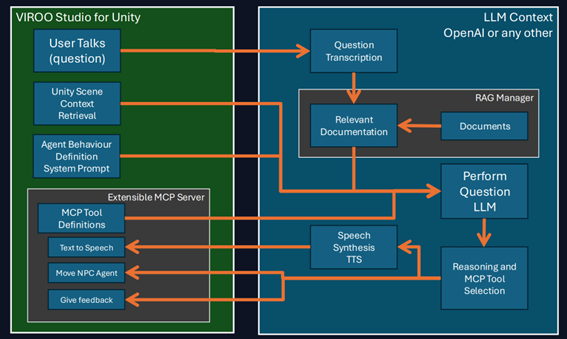
The integration is built on a sophisticated interaction loop that connects the virtual scene with the AI’s reasoning pipeline.
- Input & Transcription: When a user asks a question via microphone, the system captures the audio and uses a service to transcribe it into text.
- Dual-Layer Context Retrieval:
- The RAG Manager: The system searches for a cache of document “embeddings” to find relevant paragraphs based on the user’s question.
- Context Providers: In parallel, “Context Provider” components gather real-time information from the Unity scene, such as camera position and interactive objects.
- The AI Query: All components—the system prompt, user query, retrieved documents, and real‑time scene context—are consolidated into a single request sent to the LLM.
- Reasoning & Execution (MCP): The AI then determines which MCP (Model Context Protocol) tools to invoke, enabling actions such as moving an NPC, spawning objects, or delivering contextual visual feedback.
Customization and Extensibility
Virtualware emphasized that the system is highly flexible. Creators can define System Prompts using natural language to dictate how the AI behaves (e.g., setting spatial reasoning rules like “inform always about the distance”). Developers can also extend the system by inheriting from the AIContextProviderBaseComp or implementing the IMCPTool interface to create custom tools.
The Future of VIROO AI
While the integration is currently in a refinement process and not yet fully released, Virtualware shared a roadmap for the future:
- Private & Local Models: Support for running local LLMs (like Qwen, Mistral or Llama) via vLLM or Ollama to ensure data privacy and reduce latency.
- Visual Scripting: The ability to register AI tools through visual scripting interfaces.
- Autonomous Exploration: Allowing the AI to call tools on its own demand to traverse a scene and find information not initially provided in the context.
—
🤝 Become a Partner
📧 Other issues, contact us by form
💬 Join us on Discord
💼 Follow us on LinkedIn
▶️ Subscribe to our YouTube Channel